Zero Trust Network Access for Small Businesses: How It Actually Works
Here’s a hypothetical worth sitting with: a bookkeeper at a 12-person accounting firm logs into the company VPN from her laptop on a Tuesday morning, the same way she has for the past three years. What nobody catches until Thursday is that her laptop picked up a credential-stealing infection the week before, and the VPN connection just handed whoever controls that malware the same access she has: the client database, the shared drive, the accounting software, all of it.
That’s the scenario Zero Trust Network Access was built to prevent. The principle behind it is simple to state: never trust a connection just because it made it inside the network, always verify who and what is actually asking for access, and grant only the specific application that request needs rather than the whole network. Small businesses fit this model well precisely because they tend to run lean IT operations, often without anyone dedicated to watching for anomalies around the clock. And the anxiety a lot of owners feel reading the bookkeeper scenario above is understandable, but it doesn’t require a multi-year infrastructure overhaul to address. Most cloud-based ZTNA tools are designed to layer on top of what a small business already uses rather than replace it.
The Old Model Assumed the Inside Was Safe
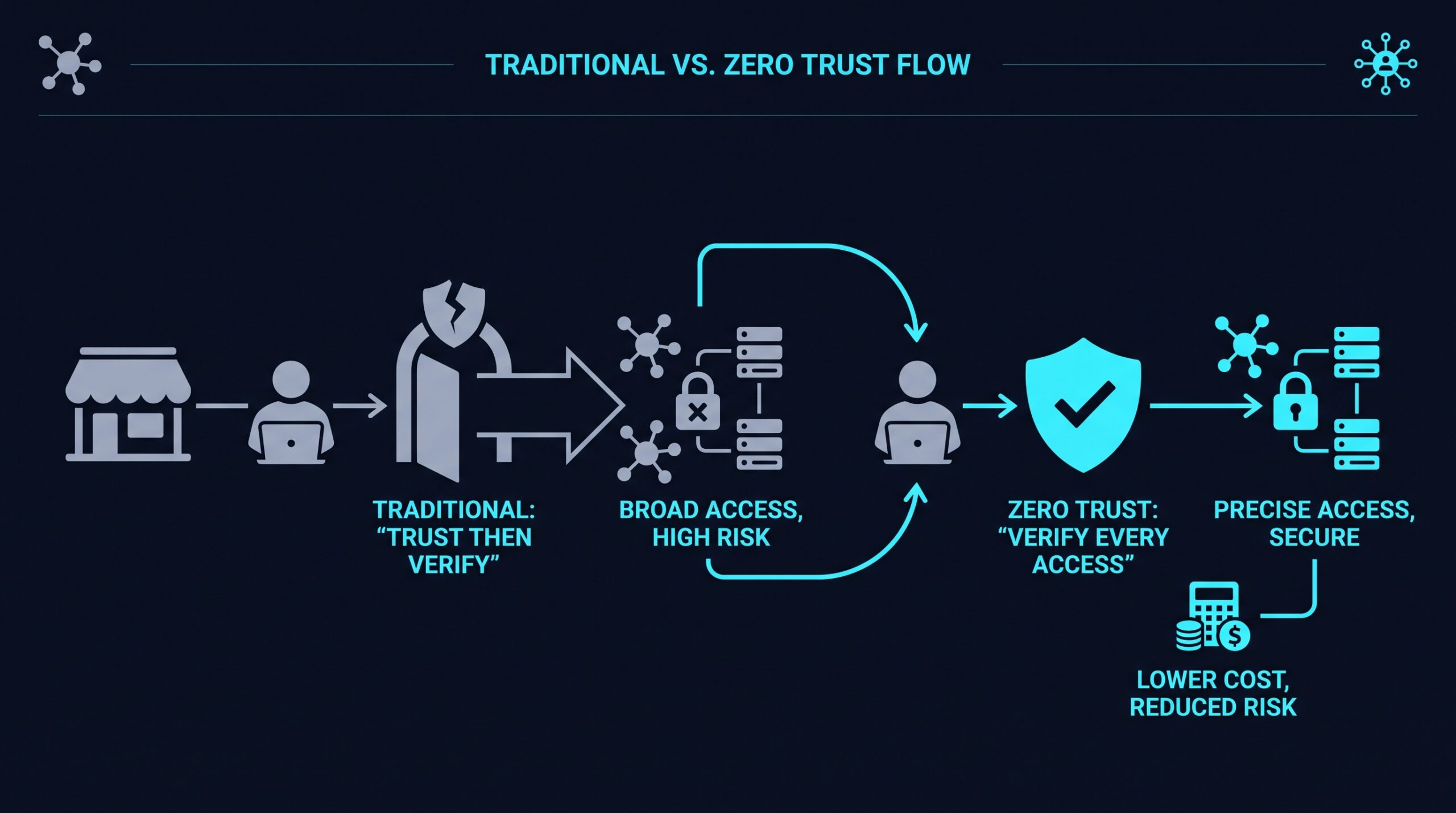
Traditional business networks were built around a castle-and-moat idea. Once you got past the moat, usually with a username, password, and a VPN connection, you were treated as trustworthy for as long as your session lasted.
That worked reasonably well when everyone sat in one office on one network. It works far less well when employees log in from home, from coffee shops, from personal phones, and from laptops that may or may not have the latest security patches installed. Once one compromised device or stolen password gets past the moat, there’s often nothing stopping it from wandering through the rest of the castle.
This is the exact weakness ransomware attacks tend to exploit. An attacker doesn’t need to break into every system. One set of credentials or one unpatched device is often enough to get inside the perimeter, and from there the network’s own trust does the rest of the work for them.
What “Never Trust, Always Verify” Actually Means
Zero Trust Network Access flips the assumption. Instead of trusting anything already inside the network, it treats every request for access, whether it’s coming from the office or from a laptop at an airport, as something that needs to prove itself.
Identity Verification, Every Time
Access starts with confirming who is actually making the request, usually through multi-factor authentication rather than a password alone. Passwords get phished, reused, and leaked. A second factor, like a mobile app approval or a hardware key, is a lot harder for an attacker to fake.
Checking the Device, Not Just the Person
A valid username and password from an infected or outdated device is still a risk. ZTNA systems typically check things like whether a device has current security patches, disk encryption enabled, and an active antivirus agent before letting it connect to anything.
Least-Privilege Access
Rather than granting access to the entire network once someone is verified, ZTNA connects a user directly to the specific application or resource they need, like the accounting software or a shared drive, and nothing more. If a marketing contractor only needs access to the content management system, that’s all they get. They never even see that a payroll server exists.
Continuous Verification, Not a One-Time Gate
Traditional logins verify you once and trust that session for hours afterward. ZTNA architectures are built to re-check conditions throughout a session, so if a device’s security posture changes mid-session, say a security agent gets disabled, access can be revoked without waiting for the user to log out and back in.
How This Differs From a Standard VPN
A VPN’s job is to extend your office network to a remote device, essentially placing that laptop inside the same trusted zone as everything in the building. That’s efficient, but it means the VPN doesn’t distinguish between “this person needs the invoicing app” and “this person now has a path to every server on the network.”
ZTNA replaces that broad network-level connection with narrow, application-specific tunnels. Providers like NordLayer market this as a more granular alternative to legacy VPNs, connecting users to individual resources rather than the network as a whole. That framing comes from the vendor’s own marketing rather than an independent audit, so it’s fair to verify it against your own use case before signing anything. (If you sign up through some of the links in this article, EdgeTrustNetwork may earn a commission at no extra cost to you.)
Why Small Businesses Specifically Attract This Risk
It’s tempting to assume that a company with a dozen employees and no household name isn’t an interesting target. But attackers running automated scanning tools and phishing campaigns aren’t necessarily hand-picking targets by brand recognition. They’re often just looking for whichever door is unlocked.
Small businesses frequently have fewer layers of defense than larger enterprises: no dedicated security operations team, less budget for monitoring tools, and sometimes a single IT person handling everything from printer jams to firewall rules. That combination can make a smaller company an appealing entry point, particularly if it also happens to be a vendor or supplier to a larger organization an attacker actually wants to reach.
There’s also a practical reality small business owners tend to underestimate: a breach doesn’t need to be sophisticated to be damaging. A single reused password or one employee clicking a convincing phishing email can be the entire attack, and a flat network with no internal segmentation means that one mistake can cascade through everything else fast.
The Building Blocks of a ZTNA Setup
Getting from “we use a VPN and hope for the best” to a zero trust setup involves a handful of core pieces working together, though how they’re packaged varies by provider.
- An identity provider that handles authentication and multi-factor prompts, often integrated with tools your business already uses like Google Workspace or Microsoft 365
- Device posture checks that confirm a laptop or phone meets basic security requirements before it connects
- Application-specific access policies that define exactly which resources each role or individual can reach
- Microsegmentation, which limits how far a connection can travel even after it’s granted, so a compromised account can’t hop from one system to another unchecked
- Logging and visibility, so that if something does go wrong, there’s a record of what accessed what and when
Not every small business needs every one of these on day one. Most providers let you start with identity and access policies and layer in device checks and segmentation as the setup matures.
Addressing the “Isn’t This a Huge Project” Worry
The word “zero trust” can sound like it requires ripping out existing infrastructure and retraining every employee. In practice, most cloud-based ZTNA providers, including Cloudflare Access, Twingate, and Cisco Duo, are built to sit on top of your existing applications and identity systems rather than replace them outright.
A common rollout path looks something like this: connect the ZTNA tool to your existing identity provider, define access policies for your highest-value applications first (accounting software, client databases, admin panels), roll it out to a small group of employees, then expand once the kinks are worked out. Vendors in this space commonly advertise setup timelines measured in days or weeks rather than the years associated with a full network rearchitecting, though how quickly that actually plays out for you depends on how many applications and users you’re onboarding, and that timeline claim comes from vendor marketing rather than an independent benchmark.
Cost is another sticking point, and a fair one to raise. Many ZTNA vendors publish per-user monthly pricing on their own sites rather than flat enterprise license fees, but the specifics vary enough between providers that it’s worth checking a given vendor’s current pricing page rather than assuming a number in advance. Either way, it’s a recurring cost, and one worth weighing against what your business already spends on VPN licensing and the IT hours lost to troubleshooting remote access problems.
Questions to Ask Before You Pick a Provider
Before committing to any platform, get clear answers on a few things:
- Does it integrate with the identity system you already use (Google, Microsoft, Okta)?
- Can policies be set per application, or only at the network level?
- What happens to access when a device fails a security check mid-session?
- How is logging handled, and can you actually review it without a dedicated security analyst?
- What setup timeline should you expect based on your actual number of users and applications, not the vendor’s general marketing figure?
Getting straight answers to these before signing a contract helps avoid a situation where a business adopts zero trust in name but ends up with a configuration that behaves like the old VPN model underneath.
Back to That Bookkeeper’s Laptop
Return to the hypothetical from the start. If that accounting firm had application-specific access policies in place, the infected laptop attempting to reach the client database would have triggered a device posture check it couldn’t pass, and the connection would have been cut off before it ever touched a single file. That’s the practical difference zero trust makes. It doesn’t promise nothing bad ever happens. It builds the system so one compromised device or one stolen password doesn’t automatically turn into a company-wide incident.