What Zero Trust Network Access Actually Means for Your Small Business
A remote employee logs into your company system from a coffee shop. Her laptop is on the same Wi-Fi as a dozen strangers. Once she connects to your VPN, she’s inside your network, same as if she’d walked into the office and plugged into the server room.
That’s the moment most small business owners don’t think about until something goes wrong. Traditional remote access tools were built on a simple assumption: if you’re in, you’re trusted. Zero Trust Network Access flips that assumption on its head, and understanding why matters more than memorizing the acronym.
The Old Model Trusted the Network Itself
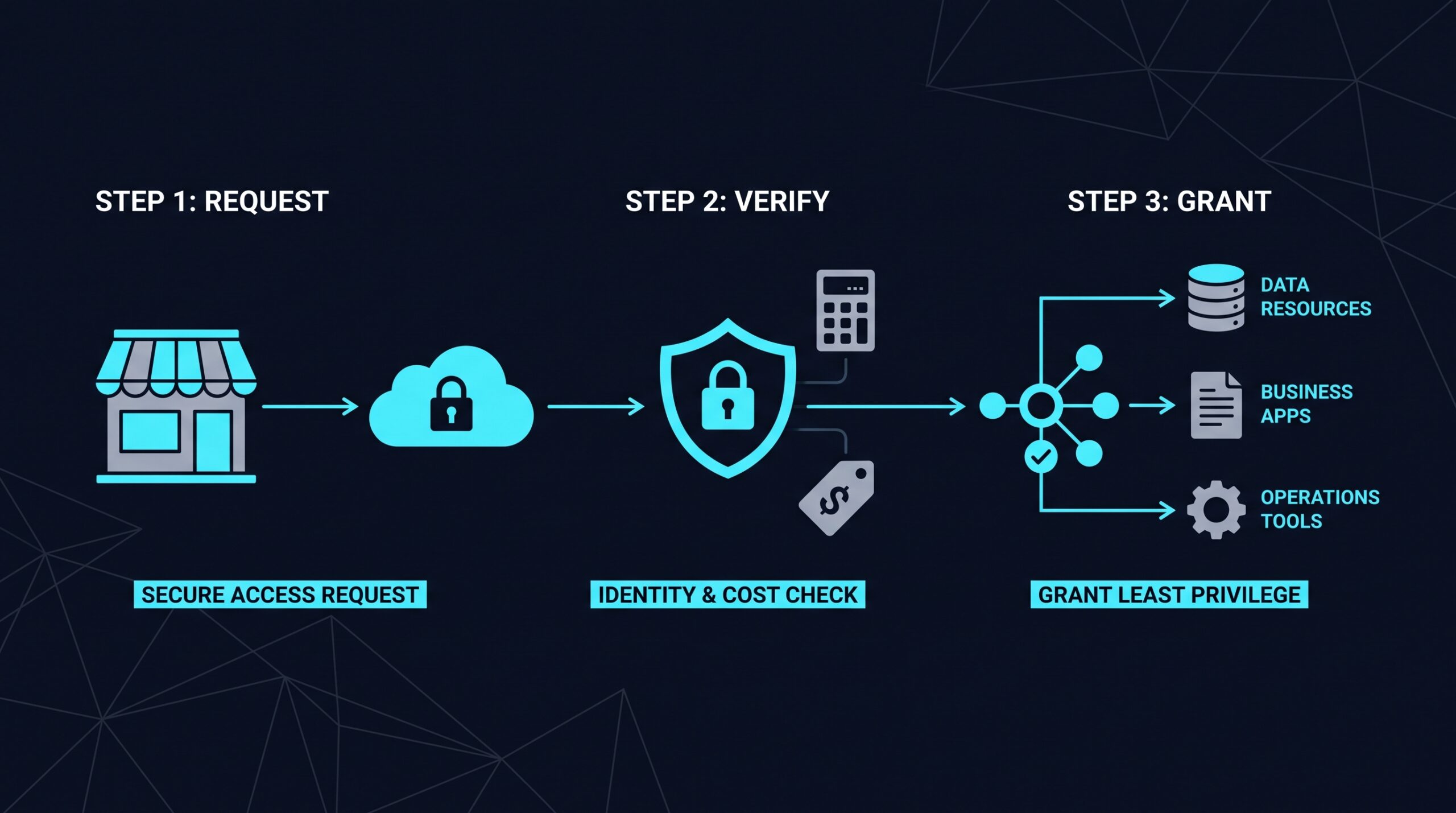
For decades, business networks worked like a building with one locked front door. Get past the door (log into the VPN, join the office Wi-Fi) and you could walk down any hallway, open any office, and browse any filing cabinet inside.
This is often called the “castle and moat” approach. Build a strong perimeter, trust everything and everyone once they’re inside it. It made sense when employees worked from one office, on one network, using company-owned computers that never left the building.
That world doesn’t describe most small businesses anymore. Staff work from home, contractors log in from their own laptops, and cloud tools like accounting software or CRMs live outside your office network entirely. The moat stopped being the edge of your risk.
So What Does Zero Trust Actually Mean?
The name sounds absolute, but the idea is more measured than “trust nobody, ever.” Zero Trust Network Access means no user or device is automatically trusted just because they’re connected to the network. Instead, every request to reach an application or file gets checked, based on who’s asking, what device they’re using, and whether that access makes sense right now.
The concept has a specific origin. Analyst John Kindervag, then at Forrester Research, coined the term “Zero Trust” around 2010, arguing that internal network traffic deserved as much scrutiny as traffic coming from outside. The U.S. National Institute of Standards and Technology later formalized the approach in its publication NIST SP 800-207, which describes Zero Trust Architecture as a set of principles rather than a single product you install.
That distinction matters. Zero Trust isn’t a piece of software you buy once. It’s an approach to access built around a few core habits.
Verify Identity Every Time
Instead of one login granting broad access, each request to open an app or file gets its own check. This usually combines a password with a second factor, like a code from an app on your phone, so a stolen password alone isn’t enough to get in.
Check the Device, Not Just the Person
A username and password confirm who someone claims to be. They don’t confirm whether the laptop they’re using has up-to-date security patches or is riddled with malware. Zero Trust systems typically look at device health too, sometimes blocking access from devices that don’t meet basic security standards.
Grant the Narrowest Access Possible
This is the principle of least privilege: give people access only to the specific applications or files they need for their job, nothing more. A bookkeeper doesn’t need access to your product design files, and under a Zero Trust model, they simply wouldn’t have a path to reach them, even if they were technically on the same network.
Break the Network Into Smaller Pieces
Rather than one flat network where everything can reach everything else, Zero Trust setups often divide systems into smaller segments, a practice called microsegmentation. If one segment is compromised, the damage doesn’t automatically spread to the rest.
How This Looks in Practice for Your Team
None of this needs to feel like extra friction for employees doing their jobs, though it does change the login experience somewhat. Instead of connecting to one big VPN and getting broad network access, staff typically authenticate through a lightweight client or browser session, confirm their identity with multi-factor authentication, and get routed directly to the specific application they need.
Behind the scenes, this is often built on what’s called a software-defined perimeter, a model where connections are established only after identity and device checks pass, rather than exposing the network itself to anyone who connects. The user doesn’t see a “network.” They see the apps they’re allowed to use, and nothing else appears on their radar at all.
For IT, this means visibility that a traditional VPN doesn’t offer. Instead of a binary “connected or not” status, administrators can see who accessed what, from which device, and when, which matters both for spotting suspicious activity and for basic compliance recordkeeping.
Common Misunderstandings Worth Clearing Up
A few myths tend to follow this topic around, and they’re worth addressing directly.
“We already have this because we use multi-factor authentication.” MFA is one piece of Zero Trust, not the whole picture. Verifying identity strongly is necessary but doesn’t address device health, least-privilege access, or network segmentation on its own.
“This is only for large enterprises with big IT departments.” The principles apply at any size. What changes is the scale and complexity of the rollout, not whether the underlying idea is relevant to a ten-person company versus a ten-thousand-person one.
“It’s one product I install and I’m done.” Vendors sell tools that implement Zero Trust principles, but the framework itself, as NIST describes it, is a set of practices. Buying software without adjusting how access is granted and reviewed won’t get you the full benefit.
Does a Small Business Actually Need This?
It’s a fair question, especially if you’ve operated for years with a VPN and never had an obvious problem. The honest answer depends on what your business looks like now rather than how it looked when you set up your current systems.
If your team is fully in-office, using only company-owned devices, on a network you control end to end, the urgency is lower. But if any staff work remotely, if contractors or freelancers need occasional access to specific tools, or if you rely on cloud applications that live outside your office network, the castle-and-moat assumption has already broken down whether or not you’ve noticed.
Insurance underwriters and business clients doing vendor risk assessments have also started asking more pointed questions about access controls, not just whether a business has “a firewall.” Being able to describe how you limit and verify access, even in plain terms, is increasingly part of those conversations.
What Adopting This Looks Like
There’s no single, universal cost or timeline that applies across the board, and any figure offered without context should be treated skeptically. The right scope depends on how many applications you’re protecting, how your current network is set up, how many employees and contractors need access, and whether you’re replacing an existing VPN or adding controls alongside it.
Most businesses don’t flip a switch overnight. A typical path starts with the highest-risk access points, like remote logins to financial systems or customer data, then expands coverage to other applications over time. Running the old and new systems in parallel for a stretch, rather than an abrupt cutover, tends to reduce disruption for staff who are already used to how things work.
Several vendors offer Zero Trust Network Access aimed specifically at smaller teams rather than sprawling enterprise deployments. NordLayer, for instance, positions itself around straightforward setup for businesses without a dedicated security team, though that’s the vendor’s own framing and worth verifying against your specific needs during a trial or demo. (If you sign up through some of the links in this article, EdgeTrustNetwork may earn a commission at no extra cost to you.)
Questions to Ask Before You Choose a Path
A few practical questions tend to separate a good fit from a poor one:
- Does the tool support the specific applications your team actually uses, including any older internal software that wasn’t built with cloud access in mind?
- How does it handle contractors or seasonal staff who need short-term, limited access rather than a permanent account?
- What does the setup process look like for someone without an in-house IT specialist, and is there support available if something breaks at 6pm on a Friday?
- How is device health checked, and what happens when an employee’s personal device doesn’t meet the bar?
The answers will differ by vendor, and it’s reasonable to ask for a trial period before committing.
Back to That Coffee Shop
That employee logging in from a coffee shop doesn’t disappear once you adopt Zero Trust principles. Public Wi-Fi is still public Wi-Fi. What changes is what happens after she connects: her identity gets checked, her device gets a look, and she lands only in the specific application she needs, not a wide-open network waiting to be explored by whoever else might be watching that connection. That’s the actual shift, quieter than the name suggests, but a more honest match for how small businesses actually operate today.