MFA Isn’t Zero Trust: Why Turning On Two-Factor Login Doesn’t Close the Door
In 2018, a security researcher discovered that Panera Bread’s website was quietly leaking customer order data, including names, email addresses, and partial payment card numbers. The researcher reported it. Panera reportedly sat on the fix for months. The problem wasn’t a stolen password or a brute-forced login. It was a system that never kept checking whether access to that data still made sense once it was already flowing.
That’s the gap a lot of small business owners miss when someone tells them “just add MFA” and treats the conversation as finished. Multi-factor authentication is a real improvement over a bare password. It answers one question at one moment. Zero Trust is a different kind of commitment. It keeps asking that question, in different forms, for as long as someone has access to your systems.
What MFA Actually Does
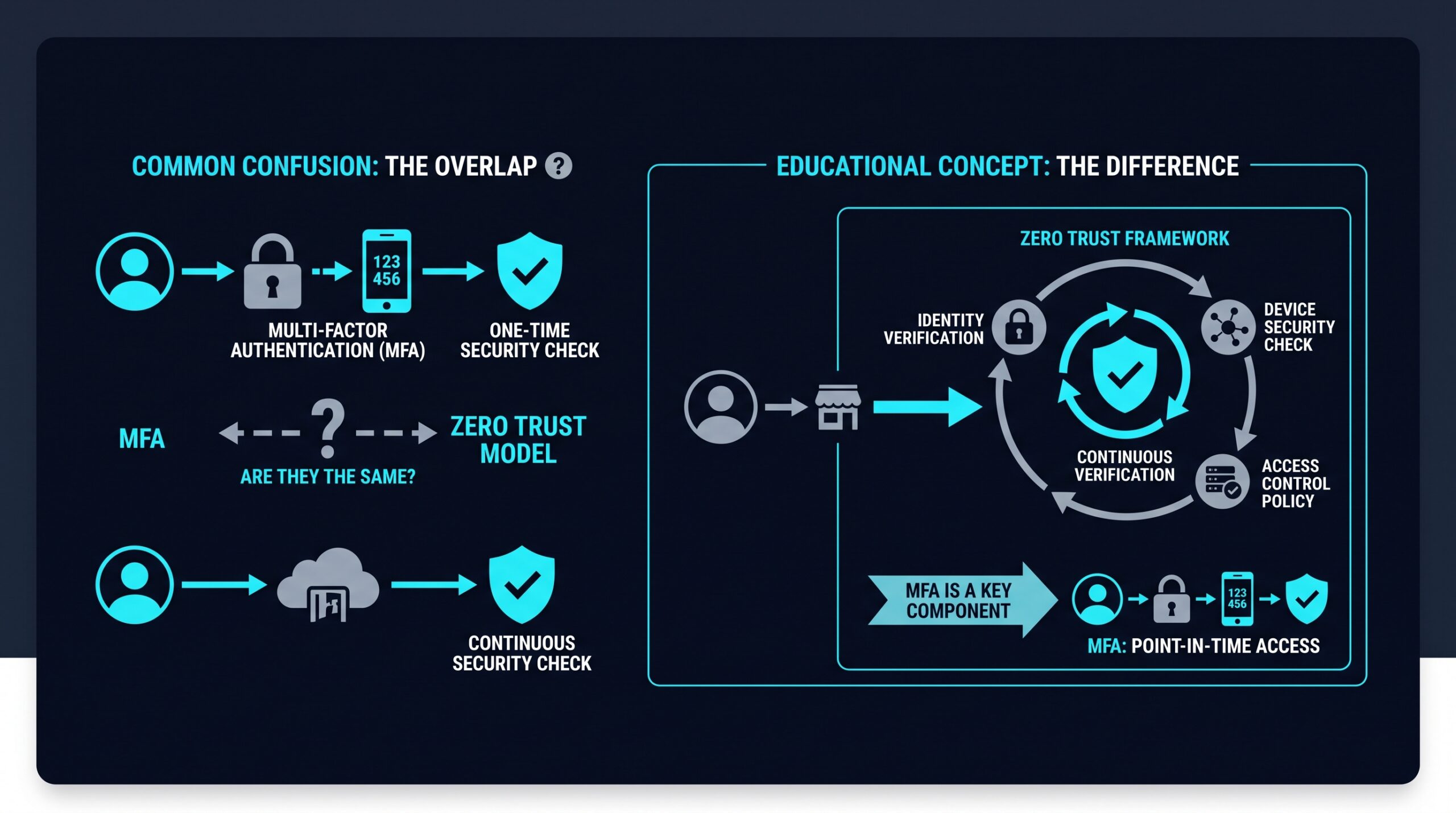
Multi-factor authentication asks for more than a password at the login screen. Typically that means something you know (a password), something you have (a phone or hardware key), or something you are (a fingerprint). If a password leaks, the attacker still needs that second factor to get in.
That’s a real barrier, and it stops a large share of casual credential-stuffing attempts cold. But MFA’s job ends once login succeeds. After that moment, most systems trust the session, the device, and the user’s activity without checking again, sometimes for hours, sometimes until a token expires on its own schedule.
What Zero Trust Actually Means
Zero Trust is a security model, not a single tool or login prompt. The core idea, often summarized as “never trust, always verify,” holds that no user, device, or application gets automatic trust just because it’s inside the network or already logged in.
Every request to access a file, app, or system gets evaluated on its own terms: who’s asking, what device they’re using, where they’re connecting from, and whether the request fits that person’s normal pattern. A few concepts show up repeatedly in how this gets built.
Least Privilege Access
Users and devices only get access to the specific resources their role requires, not the entire network. An accountant doesn’t need access to the marketing team’s design files, so a Zero Trust setup simply doesn’t grant it.
Microsegmentation
Instead of one flat network where anyone inside can potentially reach anything, the network gets divided into smaller zones. If one segment is compromised, the damage stays contained rather than spreading freely.
Continuous Verification
Trust isn’t a one-time decision made at login. Zero Trust systems reassess risk throughout a session, flagging things like a sudden change in location, an unfamiliar device, or unusual file access patterns.
Where the Confusion Comes From
The mix-up happens because MFA is often the most visible, most-marketed piece of a Zero Trust rollout. It’s easy to explain and easy to implement, so vendors lean on it, and it ends up standing in for the whole approach. In reality, MFA answers one question: is this really you, right now, at the front door? Zero Trust asks that question repeatedly, at every door, for as long as someone is in the building.
Think of MFA as a stronger lock on the front entrance. Zero Trust is the decision to also lock every internal door, check IDs at each one, and watch for anyone wandering somewhere they shouldn’t, even after they’ve already proven who they are once.
What Zero Trust Adds on Top of MFA
A Zero Trust approach typically layers several things on top of, or instead of, basic MFA:
- Device posture checks: verifying the connecting device is patched, running approved software, and not flagged as compromised, not just that the right person is typing.
- Context-aware access rules: adjusting what’s allowed based on location, time of day, or network type.
- Session monitoring: watching for behavior that looks off after login, rather than assuming everything is fine once credentials check out.
- Network segmentation: limiting lateral movement so a single compromised account or device can’t reach everything else.
None of this replaces MFA. It builds around it, treating authentication as one input among several rather than the final checkpoint.
The Real-World Gap: What MFA Alone Misses
The Panera incident points to a known weak spot in how a lot of businesses think about security: a system can be fully authenticated and still leak information if nothing is watching what happens after that first check.
Session hijacking works the same way on a smaller scale. Research from NHIMG on authentication bypass techniques has described how attackers who steal an active session cookie or token after a legitimate login don’t need to beat MFA at all, because the system already believes that user proved who they are. MFA doesn’t fire a second time mid-session. The attacker simply inherits the trust the real user already earned.
Compromised or unmanaged devices create a similar blind spot. MFA confirms identity, but it doesn’t typically check whether the laptop being used is infected with malware or missing security patches. A Zero Trust model is built to catch that second part, evaluating the device and its behavior, not just the credentials typed into it. A login from the right person on the wrong device still gets questioned.
How Small Businesses Can Move From MFA to Zero Trust
For most small businesses, this isn’t an all-or-nothing switch. It’s a progression. Keep MFA in place, since it remains a meaningful barrier against credential theft, and build additional controls around it rather than replacing it.
Platforms built around Zero Trust Network Access, like NordLayer, are designed to pair identity verification with device checks and segmented access, so a login becomes one input into an access decision rather than the whole decision. If you sign up through some of the links in this article, EdgeTrustNetwork may earn a commission at no extra cost to you. Pricing and feature sets vary across vendors in this category, so it’s worth checking the specifics against how your team actually works before committing to one.
The practical starting point for most owners looks something like this:
- Keep MFA enabled everywhere it’s supported, especially email, financial tools, and admin accounts.
- Map out who actually needs access to what, and tighten permissions accordingly rather than leaving default broad access in place.
- Add device checks so unmanaged or outdated devices aren’t trusted the same as company-managed ones.
- Look for tools that monitor sessions after login, not just at the door.
MFA Is a Lock, Zero Trust Is the Whole Building
Panera’s breach didn’t happen because someone guessed a password. It happened because a system trusted a connection once and then stopped paying attention for months. That’s the exact failure mode Zero Trust is built to close: device checks, segmented access, and ongoing verification that don’t stop watching after the first “yes.”
MFA and Zero Trust aren’t competitors, and they aren’t synonyms either. One is a checkpoint. The other is a standing policy that keeps checking long after the checkpoint is behind you. Businesses that understand the difference tend to build security that holds up after the first login, not just at it, which is exactly where Panera’s defenses fell short.