How Zero Trust Network Access Stops One Bad Login From Becoming a Full Breach
Picture this: an employee’s laptop gets infected with malware while they’re working from a coffee shop, and because your company uses a traditional VPN, that infected device now has a direct tunnel into your entire network, no extra questions asked. Zero Trust Network Access, or ZTNA, was built to close exactly that gap by treating every connection request as unproven until it checks out, rather than assuming that anyone who got past the front door should be trusted with the whole building.
The Problem With “Trusted” Networks
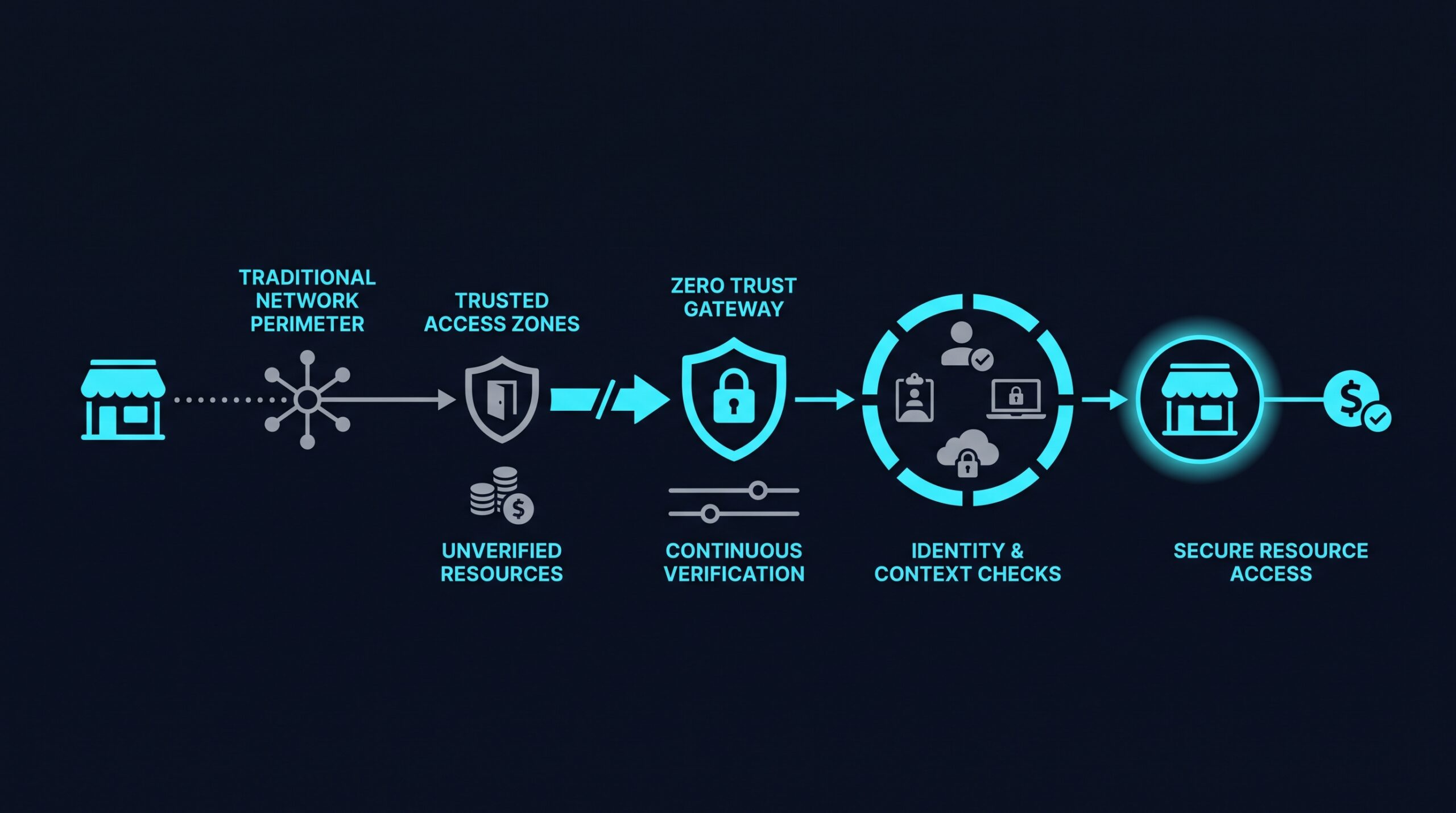
Traditional remote access tools like VPNs work on a simple assumption: once you’ve logged in successfully, you’re inside the perimeter, and inside is safe. That model made sense when most work happened on office computers connected to office networks. It makes a lot less sense now that employees log in from home routers, phones, and shared coffee shop Wi-Fi, any of which could be compromised without anyone noticing.
The core issue is that a VPN typically grants access to the network as a whole, not just the specific application someone needs. If an attacker steals one employee’s VPN credentials, whether through phishing or a leaked password, they often gain a broad view of internal systems, file shares, and other devices sitting on that same network. Security researchers call this lateral movement, and it’s one of the reasons a single compromised account can turn into a much larger incident.
How Zero Trust Network Access Actually Works
The National Institute of Standards and Technology laid out the founding logic for this approach in its 2020 publication SP 800-207, which describes zero trust architecture around one guiding rule: never trust, always verify. ZTNA takes that idea and applies it specifically to how employees connect to business applications and data.
Verifying Every Request, Not Just the Login
With a VPN, verification usually happens once, at login. With ZTNA, the system checks each request for access, looking at who the user is, what device they’re on, whether that device meets basic security standards, and sometimes even where the request is coming from. If something looks off mid-session, like a device that suddenly fails a security check, access can be adjusted or revoked without waiting for the person to log out and back in.
This is often paired with multi-factor authentication and identity provider integration, so the system isn’t just trusting a password but confirming identity through multiple signals.
Granting Access to Applications, Not the Whole Network
Instead of dropping a user onto the network the way a VPN does, ZTNA connects them directly to the specific application or resource they’re authorized to use, and nothing else. This is sometimes called a software-defined perimeter, because there’s no broad network perimeter to breach in the first place, just a series of individually gated resources.
For a small business, this might mean an employee can reach the accounting software and the shared drive they need for their job, but has no visibility into the HR system, the server room controls, or a colleague’s device, even though all of it technically sits on the same company network.
Limiting the Damage From Compromised Credentials
Because access is scoped down to individual applications rather than the full network, a stolen password or infected laptop doesn’t automatically become a company-wide problem. This principle, often called least-privilege access, means each account only has the permissions it actually needs to do its job, which shrinks the amount of damage any single compromised account can do. It doesn’t make a business immune to breaches, but it does reduce how far a breach can spread once it starts.
ZTNA vs. VPN: What Changes for a Small Business
The practical difference for a small business owner comes down to exposure and control. A VPN tends to be simpler to set up initially but harder to fine-tune, since access decisions are often all-or-nothing once someone connects. ZTNA takes a bit more upfront configuration to define who should reach which applications, but that configuration is also what gives owners a clearer picture of who can touch what.
There’s a reliability angle here too, and recent data backs it up. A 2025 survey from DH2i found that 48% of IT professionals reported ongoing connection reliability problems with VPNs, particularly on remote or shared networks. Separately, Verizon’s 2025 Data Breach Investigations Report recorded a 34% year-over-year jump in breaches tied to exploited vulnerabilities in edge devices and remote access infrastructure, including VPNs. NordVPN’s own support documentation, updated in December 2025, still includes troubleshooting steps for connection drops on older protocols like PPTP and L2TP, which suggests these issues haven’t gone away entirely even as newer protocols have improved things.
Gartner’s 2025 research on secure access technology points to growing adoption of ZTNA specifically because it avoids the network-wide exposure that VPNs carry by design. A separate report from TechTarget and OpenVPN, “Secure Access Technology Trends,” published in April 2025, found a similar shift among IT decision-makers evaluating remote access options for hybrid teams. None of this means VPNs are unusable, but the pattern across these sources points the same direction: less friction and less exposure with architectures built around per-app access rather than full network access.
What Adopting ZTNA Looks Like in Practice
Rolling out ZTNA doesn’t usually mean ripping out existing infrastructure overnight. Most small businesses start by mapping out which applications and data actually need protecting, then defining access policies around roles: what does a bookkeeper need versus a warehouse manager versus a contractor who’s only around for a few months.
From there, the technical setup generally involves connecting the ZTNA platform to an identity provider so it knows who’s who, enabling multi-factor authentication, and setting device posture requirements so that outdated or unmanaged devices don’t get a free pass. Providers such as NordLayer bundle identity integration, MFA, and device checks into a single platform marketed toward teams without dedicated IT security staff, which can matter for a business that doesn’t have the resources to run its own custom-built security stack. (If you sign up through some of the links in this article, EdgeTrustNetwork may earn a commission at no extra cost to you.)
ZTNA isn’t an all-or-nothing switch, either. Many businesses run it alongside existing tools during a transition period, moving critical applications over first and expanding coverage as the team gets comfortable with the new access model.
Why This Matters Beyond the Technical Details
Small businesses are often assumed to be less attractive targets than large enterprises, but that assumption cuts both ways: it also means they frequently have fewer resources dedicated to catching an intrusion once it starts. A model that limits what any single compromised login can reach isn’t just a technical improvement. It’s a practical way to keep a bad day from turning into a business-ending one.
Back to that employee in the coffee shop with the infected laptop. Under a VPN, that one bad connection might have opened a door to the whole network. Under Zero Trust Network Access, it opens a door to exactly the resources that laptop was already allowed to touch, and nothing more.