Moving From VPN to ZTNA Without Locking Your Own Team Out
Picture this: it’s a Friday afternoon, and someone on your IT team decides this is the weekend to finally kill the old VPN and switch everyone over to a shiny new zero trust setup. By Monday morning, half the sales team can’t reach the CRM, a contractor in another time zone is locked out mid-project, and the help desk phone hasn’t stopped ringing. The technology wasn’t the problem. The rollout was.
Switching from a VPN to Zero Trust Network Access is one of the more sensible security moves a small business can make right now. But most of the disruption that happens during these switches isn’t because ZTNA is fragile or hard to use. It’s because the switch got treated like flipping a light switch instead of what it actually is: a change to how every employee logs in and reaches company systems every single day.
Why Businesses Are Rethinking the VPN
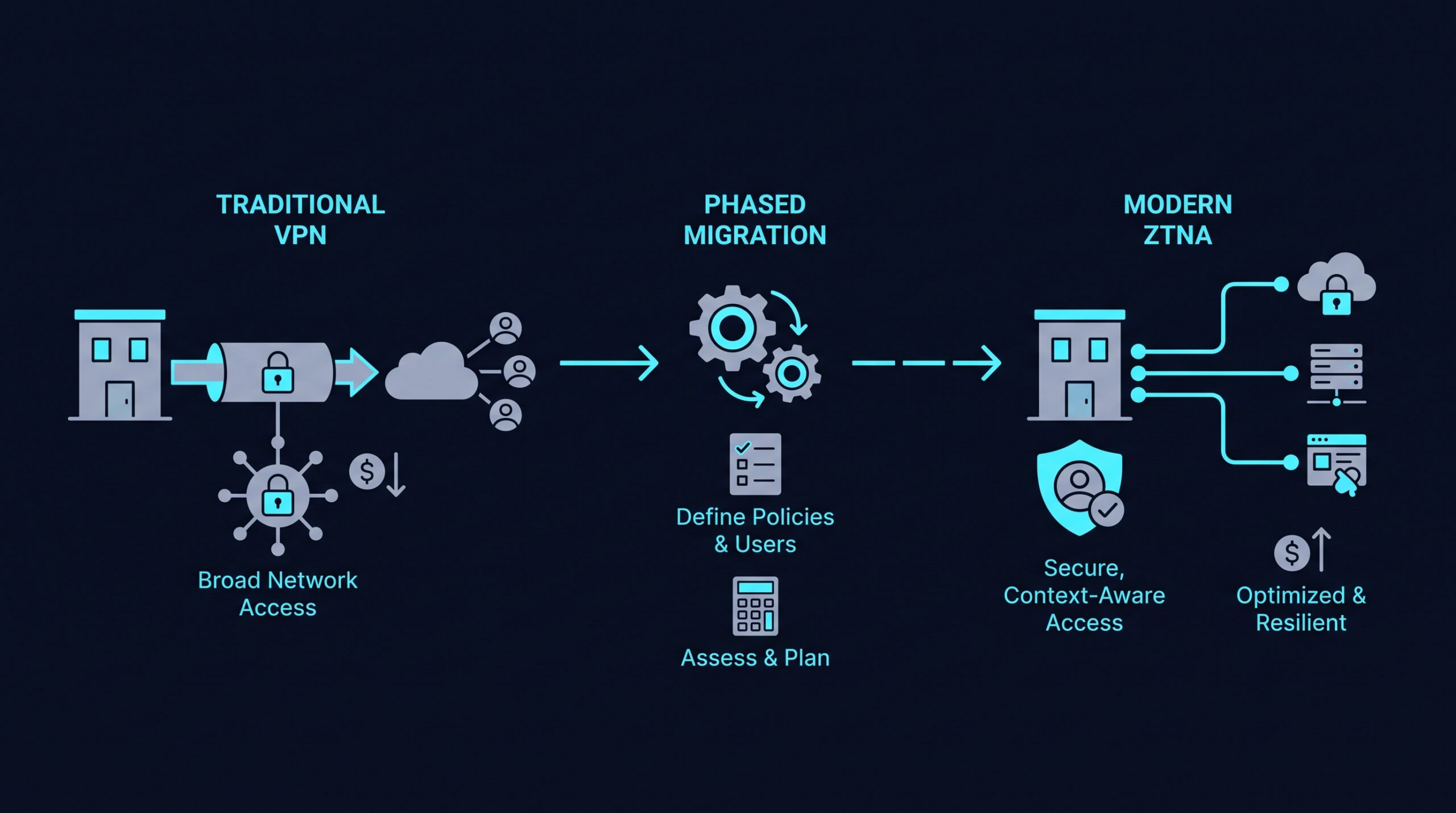
A traditional VPN works by putting a remote device on your company network, more or less as if it were plugged into an office ethernet port. Once someone authenticates, they typically have broad reach across internal systems, not just the one app they needed. That model made sense when most work happened inside a single office network with a handful of file servers.
It fits less well now. Teams work from home, coffee shops, client sites, and personal devices, and companies lean on more cloud tools than a single VPN tunnel was ever built to funnel traffic through. The bigger concern for a lot of owners is what happens if one login gets compromised: with a flat network behind the VPN, an attacker who gets in can often move sideways toward systems that have nothing to do with the account they broke into.
What Actually Changes With ZTNA
Zero Trust Network Access flips the model. Instead of granting access to a network, it grants access to specific applications, one at a time, based on who the user is, what device they’re on, and sometimes other signals like location or time of day.
There’s no broad network handshake happening in the background. A user requesting the accounting system gets checked and connected to that system specifically, not dropped onto a segment where the accounting server happens to sit next to the file share and the internal wiki. Access also gets checked continuously rather than once at login, so a session doesn’t automatically stay trusted just because it started out that way.
This is a different way of connecting to work, and that difference is exactly why swapping it in overnight tends to go badly. It touches login behavior, app access, device requirements, and sometimes MFA prompts your team has never seen before.
Start With an Inventory, Not a Deployment
Before any rollout plan makes sense, you need an honest list of what the VPN is actually being used for. Not what it was set up for two years ago, but what people are connecting to today: which applications, which servers, which third-party tools, and which users or contractors depend on that access.
This step is easy to rush, and it’s the one that determines whether everything after it goes smoothly. In practice, this rarely wraps up in an afternoon. Teams that take it seriously spend real time cross-checking VPN logs against actual app usage, tracking down old service accounts, and finding integrations that nobody documented anywhere.
Skipping or shortening this phase is how businesses end up with mid-migration surprises, like discovering a finance tool only works because of a VPN-dependent IP allowlist nobody wrote down.
Why the Full Switch Takes Longer Than People Expect
Owners often assume this is a project measured in weeks. For most organizations it’s closer to a slow phase-out than a cutover.
The shape of the work is fairly consistent regardless of company size: inventory, pilot, phased rollout, parallel run, then decommission. A small business with fewer applications, fewer integrations, and less internal tooling to unwind will generally move through those phases faster than a larger company would, but there isn’t really a shortcut version that skips straight from “we have a VPN” to “we don’t” without something breaking along the way. Each phase depends on the one before it finishing cleanly.
Treating this as a multi-month project rather than a weekend task is the whole trick to avoiding disruption.
Run Both Systems in Parallel, on Purpose
The safest path is keeping the VPN alive while ZTNA gets stood up alongside it, then migrating access in deliberate chunks rather than a company-wide cutover.
Pick a Pilot Group That Represents Real Usage
Don’t pilot with just the IT team. They’ll tolerate friction that regular staff won’t, and they don’t represent how a salesperson or a bookkeeper actually works day to day. A better pilot mixes a few different roles: someone in sales who needs CRM and email, someone in finance who touches sensitive internal tools, and maybe a remote contractor. That mix tends to catch access gaps before they hit everyone at once.
Migrate Applications in Waves, Not All at Once
Rather than moving every user to ZTNA simultaneously, many teams find it easier to move application by application. Start with lower-risk, cloud-based tools most people already access through a browser, then work toward the trickier internal systems once the process and support routine feel settled.
The Tricky Cases That Cause Most of the Headaches
Legacy On-Premise Applications
Older internal systems built assuming VPN-level network access sometimes weren’t designed with per-app access controls in mind. These often need extra configuration work, and in some cases a lightweight connector or gateway, to work cleanly under a ZTNA model instead of just being lifted over as-is.
Contractors and Third-Party Access
Outside users are frequently the group most affected by VPN habits, since it’s common for a contractor to get a VPN credential and much broader access than the project actually requires. ZTNA is a reasonable opportunity to fix that by scoping contractor access down to only the specific tools their work touches, rather than recreating the same broad access under a new name.
Personal and Mobile Devices
If staff have been using personal phones or laptops with the VPN, decide early whether ZTNA policies will require some form of device check before granting access. Introducing that requirement without warning is one of the more common sources of help desk tickets during a migration, so communicate it ahead of the actual switch rather than after.
Telling Your Team Before You Touch Their Login
A lot of the disruption in these migrations isn’t technical at all. It’s a login screen that looks different, a new MFA prompt, or an access request that now takes a few seconds to process instead of feeling instant, and nobody warned anyone it was coming.
Give people a heads-up before their access changes, not after. A short note explaining what’s changing, why, and who to contact if something doesn’t work goes a long way toward preventing a flood of confused support requests on migration day.
Choosing and Setting Up a ZTNA Platform
At this stage a lot of small businesses start looking at what platform will actually run their zero trust setup, since the inventory and planning work up to this point applies regardless of vendor. NordLayer is one option built with smaller IT teams in mind, offering per-application access controls and device posture checks without requiring a dedicated network engineering team to configure and maintain it. Confirm current pricing and feature details directly on the provider’s site rather than relying on secondhand figures, since plans and packaging change over time. (If you sign up through some of the links in this article, EdgeTrustNetwork may earn a commission at no extra cost to you.)
Whichever platform you land on, the same principle from earlier still applies: bring it in alongside the VPN first, prove it works for a pilot group, and only expand from there.
Knowing When It’s Actually Safe to Turn Off the VPN
Decommissioning too early is how old problems come back with new urgency. Before switching off the VPN entirely, confirm that every application, integration, and user group identified in your original inventory has a working, tested path through ZTNA, not just the obvious ones.
Keep VPN access available in some limited, monitored form for a short overlap period after the main cutover, in case an edge case surfaces that the inventory missed. Once a few weeks pass without anyone needing the fallback, that’s a reasonable signal the VPN has actually earned its retirement.
The Payoff for Going Slow
That Monday-morning scramble from the opening scenario isn’t inevitable. It’s what happens when a security upgrade gets rushed past the planning it actually needs. Move through the inventory, pilot, and phased rollout in the order they’re meant to happen, and the switch from VPN to ZTNA can end up being the quietest change your team notices all year, mostly because the CRM, the finance tool, and everything else just keeps working while the login screen changes behind the scenes.