When a Hacker Gets In Anyway: How Zero Trust Limits the Fallout
It’s 2:47 a.m. and an employee’s laptop just sent a login request from a country she’s never visited. She’s asleep. Her password wasn’t stolen because she did anything careless. A vendor she uses got breached months ago, and her credentials surfaced in a dump on a forum somewhere. By the time anyone notices, the attacker has been poking around the network for six hours.
This is the scenario that keeps small business owners up at night, and for good reason. No firewall, no spam filter, no employee training program stops every credential theft or every clever phishing email. The real question isn’t whether someone will eventually get a foot in the door. It’s what happens next.
Why Keeping Attackers Out Was Never the Whole Plan
Most small business security budgets go toward prevention: antivirus software, email filtering, a firewall at the edge of the network. These tools matter, but they share a blind spot. They’re built around the assumption that if you stop the break-in, you’ve solved the problem.
That assumption has been wrong for a long time. Credentials get phished, software has unpatched flaws, and third-party vendors with access to your systems get compromised through no fault of yours. A security strategy that only plans for “keep them out” has no answer for the day that plan fails.
This is where the conversation shifts from prevention to containment. If an attacker does get a valid login or a foothold on one machine, what stops them from reaching your accounting system, your customer database, or every other device on the network?
The Old Network Model: One Lock on the Front Door
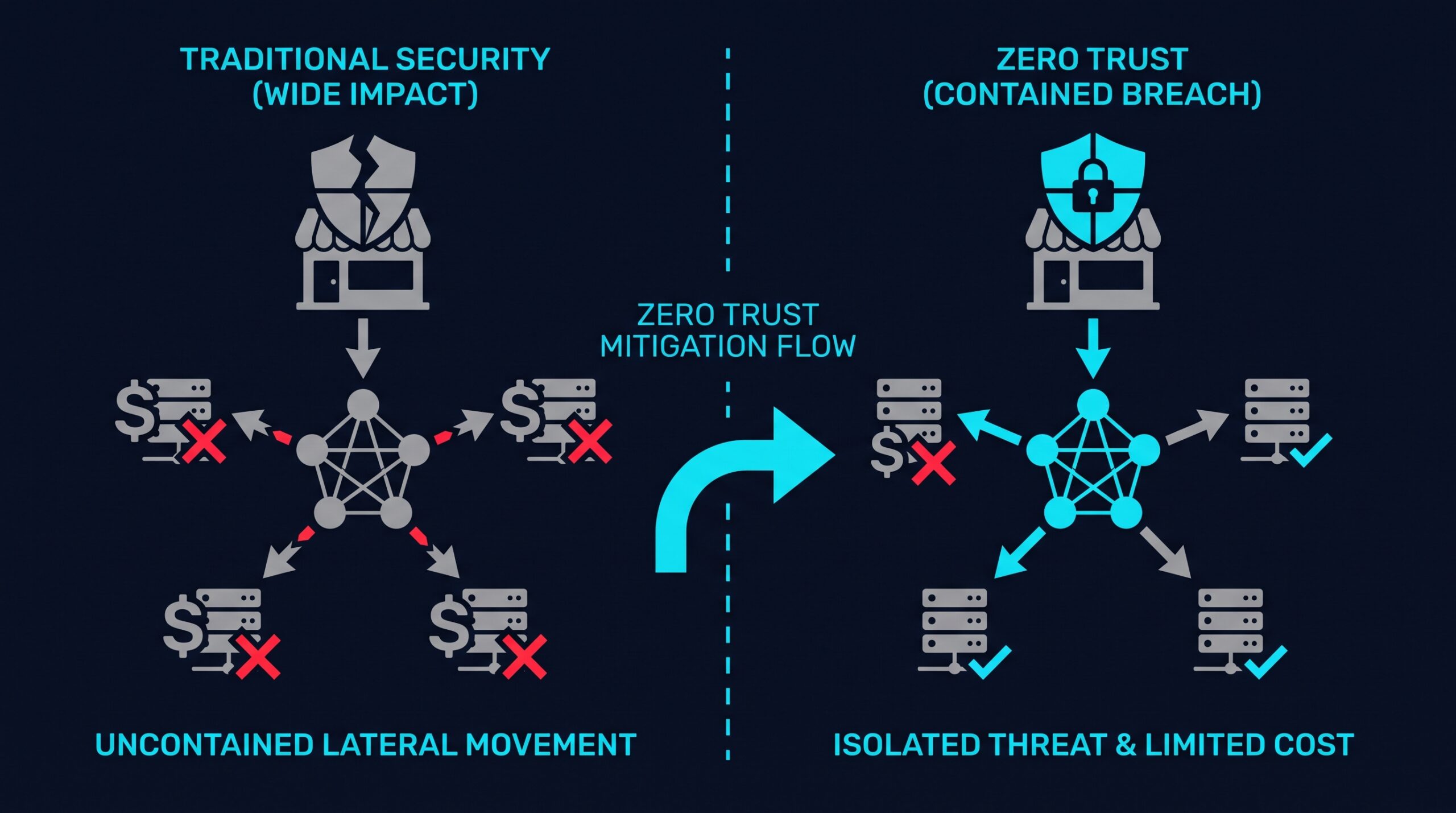
Traditional network security works something like an office building with a single locked entrance and no locked doors inside. Once someone gets past the front desk, badged or not, they can walk into any office, any filing cabinet, any server room.
This is roughly how older “castle and moat” network designs work. Once a device or user is inside the corporate network, perimeter, VPN, or otherwise, it’s often trusted to reach almost everything else on that network with little additional checking. A compromised laptop in the marketing department can, on many flat networks, reach the finance server, the customer database, and the file shares used by HR.
That’s not just a hypothetical weakness. NIST’s zero trust architecture guidance, SP 800-207, describes zero trust as a direct response to networks built around broad implicit trust once a user is past the perimeter. The guidance treats unrestricted internal movement, an attacker’s foothold starting small and spreading sideways through a flat network, as one of the problems zero trust architecture is designed to address, by requiring continuous verification for every request rather than one check at the edge.
What Zero Trust Actually Changes Once Someone Is Inside
Zero Trust Network Access flips that building analogy. Instead of one lock at the entrance, every internal door has its own lock, and every person has to prove they belong in that specific room, every time, not just at the front desk.
Microsegmentation Stops Lateral Movement
Microsegmentation breaks a network into smaller, isolated zones so a device or user in one segment can’t automatically reach resources in another. If an attacker compromises a laptop in the sales team’s segment, that compromise doesn’t hand them a path to the engineering servers or the payroll system.
This is the direct answer to the “sideways spread” problem described above. The attacker’s access gets boxed into whatever small area they first compromised, rather than opening onto the whole network. Security researchers at firms like CrowdStrike and Vectra have spent years tracking how quickly attackers move from an initial foothold to other systems once they’re inside. The consistent finding across that research is that lateral movement tends to start fast, which is exactly the behavior microsegmentation is built to cut off at the first wall instead of the last one.
Least Privilege Access Limits What a Stolen Login Can Touch
Zero Trust is built around the principle of least privilege: every user and device gets access only to the specific applications and data they need for their job, nothing more. A salesperson’s account shouldn’t be able to reach the finance database, even if that salesperson’s password gets stolen.
This matters because stolen credentials are only as dangerous as what they unlock. An attacker holding a compromised login with narrow permissions can do far less damage than one holding a login with broad, unchecked access across the network.
Continuous Verification, Not One-Time Login
In a zero trust setup, authentication isn’t a single gate you pass through once per session. Access requests get checked continuously, based on factors like device health, location, and behavior, and verification can be re-triggered if something looks unusual, like that 2:47 a.m. login from an unfamiliar country.
This is a meaningfully different approach than a VPN that, once connected, treats a session as trusted for hours. Continuous checks give the system more chances to notice and respond to behavior that doesn’t match the user’s normal pattern, rather than relying on it being caught at a single entry point.
Logging and Visibility for Faster Detection
Zero Trust architectures typically generate detailed logs of who accessed what, from where, and when, because every access request gets evaluated and recorded rather than assumed. That visibility gives IT staff or a managed security provider something concrete to investigate when something looks off, instead of guessing which of dozens of systems might have been touched.
Faster detection shortens the window an attacker has to operate. That window, how long a breach goes unnoticed and how far it spreads during that time, is the single biggest factor separating a minor incident from a company-wide disaster.
What Containment Costs Look Like at Scale
IBM’s 2025 Cost of a Data Breach Report put the global average cost of a data breach at $4.44 million, a figure built from incidents across industries and company sizes. IBM’s research over multiple years has consistently found that organizations which identify and contain a breach faster report lower overall costs than those that take longer to notice and respond. That pattern is the mechanism behind every zero trust containment argument: it isn’t that segmentation and continuous verification stop every breach, it’s that they shrink how much gets touched and how long it takes to find out.
For a small business, a breach anywhere near IBM’s global average figure would be devastating, and most small businesses won’t face one at exactly that scale. But the underlying mechanism scales down too. A contained incident that affects one segmented part of the network is a different event altogether from one that spreads unchecked across every system a company runs. Fewer systems touched means less to clean up, less to disclose, and less to explain to customers.
What This Looks Like for a Small Business Day to Day
Putting this into practice doesn’t require an enterprise security team. For most small businesses, it starts with a few concrete moves: segmenting the network so departments and device types sit in separate zones, replacing broad “anyone who’s logged in can see everything” permissions with role-based access tied to actual job needs, and requiring multi-factor authentication for access to sensitive systems rather than just a password.
A lot of this work used to require dedicated network hardware and in-house expertise most small businesses don’t have. That’s changed as cloud-based zero trust platforms have made these controls available as a subscription service rather than a capital project.
NordLayer is one example of this kind of platform, built to let smaller IT teams set up segmented access and role-based permissions without managing their own hardware. If you sign up through some of the links in this article, EdgeTrustNetwork may earn a commission at no extra cost to you. Whatever platform a business chooses, the goal stays the same: make sure one compromised account or device isn’t a master key to everything else.
Picking a Zero Trust Approach That Fits a Small Team
Not every business needs the same setup. A five-person accounting firm handling client tax documents has different containment priorities than a 40-person logistics company with drivers accessing scheduling apps from personal phones. The common thread is asking a simple question about every system: if this one account or device got compromised tomorrow, what else could the attacker reach from there?
Answering that question system by system is usually what reveals where segmentation and tighter permissions are actually needed, rather than applying the same rules everywhere out of habit.
Containment Isn’t Optional, It’s the Plan B You Need
No security setup makes a business immune to breach attempts. Phishing emails get more convincing, vendor breaches expose credentials nobody controls, and new vulnerabilities turn up in software that’s been considered safe for years.
What zero trust changes is what happens on the other side of that first compromise. Instead of one stolen password or one infected laptop opening a path to everything a business owns, it opens a path to one narrow, segmented piece of it, giving a business time to notice, respond, and shut the door before it becomes the kind of breach that makes the news.
That employee’s laptop pinging in from an unfamiliar country at 2:47 a.m. is still going to happen somewhere, to someone. The difference zero trust makes is whether that single alert is the whole incident, or just the first line of an otherwise short story.